The Processor (CPU): The Brain of the Machine
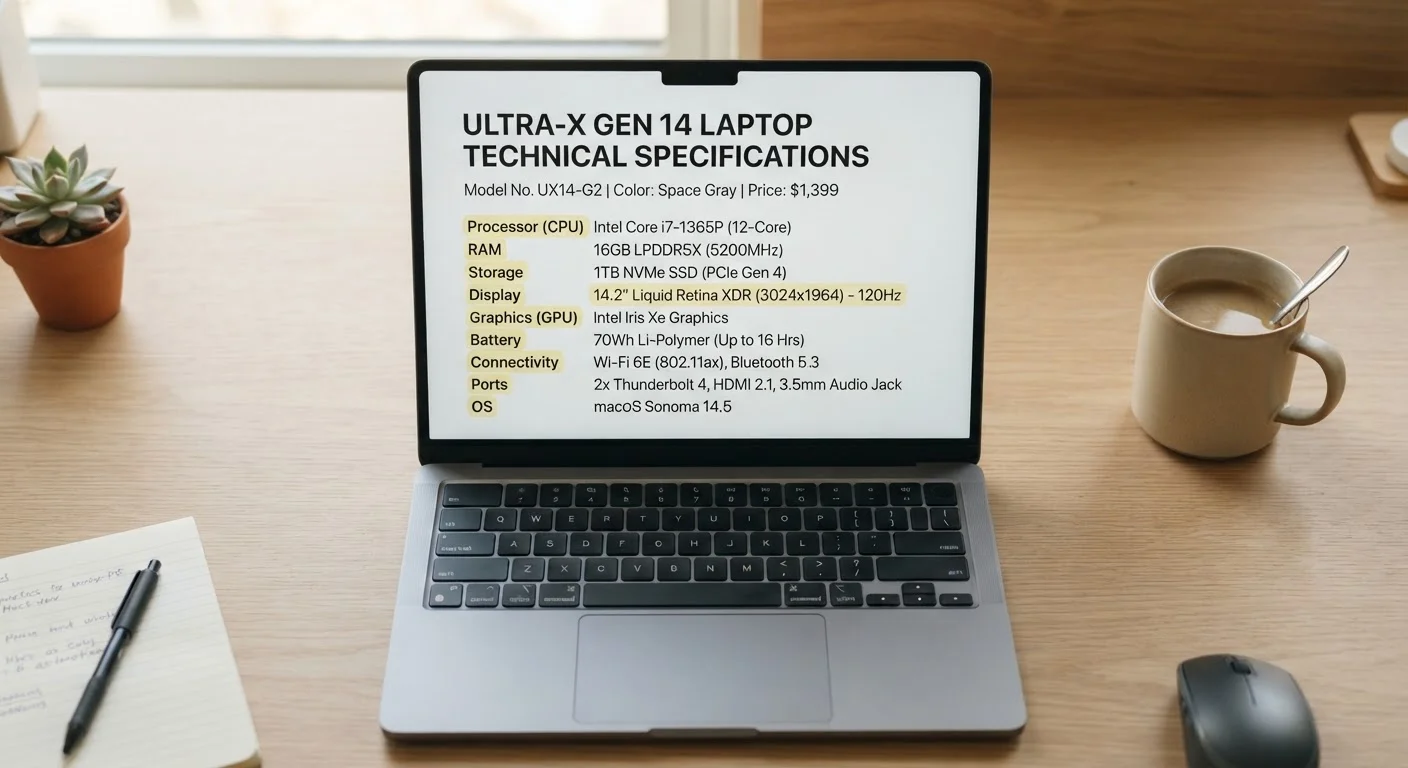
The CPU (Central Processing Unit) is the chip that runs your software, handles your browser tabs, and executes every instruction you give the computer. When you see a name like Intel Core i7 or AMD Ryzen 5, those are CPU families - the number after the brand name loosely indicates where it sits in that company's lineup, with higher numbers generally indicating more capability within the same generation.
Cores and threads matter here too. A core is an independent processing unit inside the chip; more cores allow the CPU to handle multiple tasks simultaneously. Threads are virtual subdivisions of those cores that further improve multitasking. A quad-core CPU with hyperthreading, for example, presents eight threads to the operating system.
Clock speed (measured in GHz) tells you how many cycles per second a core can process. Higher GHz can mean faster single-task performance, but comparing GHz across different CPU generations or brands is misleading - architecture improvements often make a newer, lower-GHz chip faster than an older, higher-GHz one. For a deeper look at how these numbers interact, see what processor speed numbers actually mean.
TDP (Thermal Design Power), measured in watts, indicates how much heat the CPU generates under load - and indirectly signals performance tier. A 15W chip is tuned for battery life in thin laptops; a 45W chip prioritizes sustained performance in larger machines.
CPU (Central Processing Unit)
The main processor chip in a computer, responsible for executing instructions and running software. Speed, core count, and generation all affect real-world performance.
RAM (Random Access Memory)
Short-term working memory that holds data the CPU is actively using. More RAM supports more simultaneous applications without slowdown.
NVMe
A high-speed interface protocol used by modern SSDs. NVMe drives are substantially faster than older SATA SSDs, especially for loading files and booting the system.
TDP (Thermal Design Power)
Measured in watts, TDP indicates how much heat a chip produces under load. It's a rough proxy for a chip's performance tier and power draw.
GPU (Graphics Processing Unit)
A processor dedicated to rendering images and video. Can be integrated (shared with the CPU) or dedicated (a separate chip with its own memory).
Refresh Rate
How many times per second a display updates the image on screen, measured in Hz. Higher rates produce smoother motion, which is especially noticeable in fast-moving content.
Thunderbolt
A high-speed port standard found on some laptops, capable of fast data transfer, video output, and charging through a single USB-C connector.
VRAM (Video RAM)
Dedicated memory on a discrete GPU used to store and process graphical data. More VRAM supports higher resolutions and more complex graphics workloads.
Memory, Storage, and the Display Panel
RAM (Random Access Memory) is your laptop's short-term workspace - it holds the data your CPU is actively using. More RAM allows you to run more applications at once without slowdown. Common amounts are 8GB, 16GB, and 32GB. You may also see DDR4 or DDR5 listed, which refers to the memory's generation and speed standard.
Storage specs tell you how much data the laptop can hold and how fast it can access it. An SSD (Solid State Drive) is standard on modern laptops and far faster than older spinning hard drives. NVMe is a high-speed interface protocol for SSDs - an NVMe SSD is significantly faster than a SATA SSD, which matters most for boot times and large file transfers. Storage capacity is measured in gigabytes (GB) or terabytes (TB).
| Minimum RAM for everyday use | 8GB |
| Standard modern storage type | NVMe SSD |
| Standard display resolution (Full HD) | 1920×1080 (1080p) |
| Typical indoor-adequate brightness | 300+ nits |
| Standard wireless specification | Wi-Fi 6 (802.11ax) |
| Battery capacity unit | Watt-hours (Wh) |
Display specs are often overlooked but directly affect your daily experience. Resolution (e.g., 1920×1080, also called Full HD or 1080p) describes how many pixels the screen displays. Higher resolution means sharper images. Refresh rate, measured in Hz, is how many times per second the screen updates - 60Hz is standard for everyday use, while 120Hz or 144Hz produces smoother motion, which matters for gaming or video work. Nits measure display brightness; 300 nits is adequate for indoor use, while 400+ nits helps in brighter environments. Panel types - IPS, OLED, and TN - affect color accuracy and viewing angles.
Graphics, Connectivity, and Battery Specs
The GPU (Graphics Processing Unit) handles visual rendering. Most laptops include integrated graphics built into the CPU - sufficient for everyday tasks, streaming, and light photo editing. A dedicated GPU is a separate chip with its own memory (VRAM), designed for demanding workloads like gaming, video editing, or 3D modeling.
Connectivity specs describe how you plug things in and connect wirelessly. Wi-Fi 6 (802.11ax) is the current mainstream wireless standard, offering faster speeds and better performance in crowded environments than Wi-Fi 5. Bluetooth version numbers (e.g., 5.0, 5.3) indicate compatibility and range with wireless accessories. For wired connections, look for USB-A, USB-C, Thunderbolt, and HDMI ports - Thunderbolt ports support faster data transfer and can drive external monitors.
Thunderbolt vs. USB-C: Not Always the Same
Not every USB-C port on a laptop is a Thunderbolt port, even though Thunderbolt uses the same physical connector. Thunderbolt ports support significantly faster data transfer speeds and the ability to daisy-chain external monitors and storage devices. Check the spec sheet specifically for Thunderbolt labeling if those capabilities matter to you.
Battery capacity is measured in watt-hours (Wh). A larger Wh number generally means longer runtime, but real-world battery life depends heavily on screen brightness, workload, and software efficiency. Manufacturer-claimed battery life figures are typically measured under light, controlled conditions. Weight and chassis dimensions (listed in pounds or kilograms, and inches or millimeters) round out the physical spec picture - relevant if you're comparing portability. If you're weighing a laptop against a desktop setup entirely, matching the right form factor to your life walks through that decision in full.
For a parallel reference covering smartphone terminology, the phone specs glossary covers many of the same concepts in a mobile context. And if you're new to buying computers generally, the first-time buyer's guide is a good companion to this reference.